LLM observability: what to log before users complain
LLM observability for AI features in production: what to log for every answer, how to trace why the model said it, and which cost and quality alerts matter.
By Ali HassanSenior engineer for SaaS and AI products
LLM observability is the practice of recording enough about every answer your product generates that you can explain, after the fact, why the model said what it said, and notice it going wrong before a customer does. The short answer to what you should log: the input, the sources you retrieved and their scores, the prompt version and model, the token counts, cost and latency, and what the user did next. Standard application monitoring gives you almost none of that, because it was built to watch requests, not reasoning.
Why LLM observability needs more than APM
Your existing monitoring answers one question well: is the service up and fast. That is necessary and nowhere near sufficient for an LLM feature.
A request can return a healthy status code in under a second and still be wrong, ungrounded, or quietly expensive. The status code tells you nothing about whether retrieval returned the right material, whether the model stuck to it, or whether it invented a fact the customer is about to act on.
Cost behaves differently too. It is charged per token and varies with every request, so a chart of requests per second hides the one customer whose long prompts are burning money. Latency is mostly the model and retrieval, not your own code, so your usual traces point at the wrong place.
And the failure modes are new. Empty retrieval, a refusal, a truncated reply, a silent fallback to a safe canned answer: your APM counts each of those as a success. You need a second layer of observability aimed at the answer itself.
What to record for every answer
The unit of observability for an LLM feature is one answer. For each answer, store:
- The input: the user's question, plus any earlier turns that shaped the reply.
- The retrieved sources and their scores: which chunks came back, from where, and how relevant each was judged.
- The prompt version: which template and system prompt produced this answer.
- The model: its name and settings, so you can tell which answers came from which.
- Token counts: input and output, kept separate.
- Cost: derived from the tokens and the model's rate.
- Latency: split between retrieval and generation where you can.
- User feedback: a rating, a thumbs, a follow-up reply, or nothing.
- Whether a person edited or overrode it: the strongest single signal that the answer was not good enough to send as written.
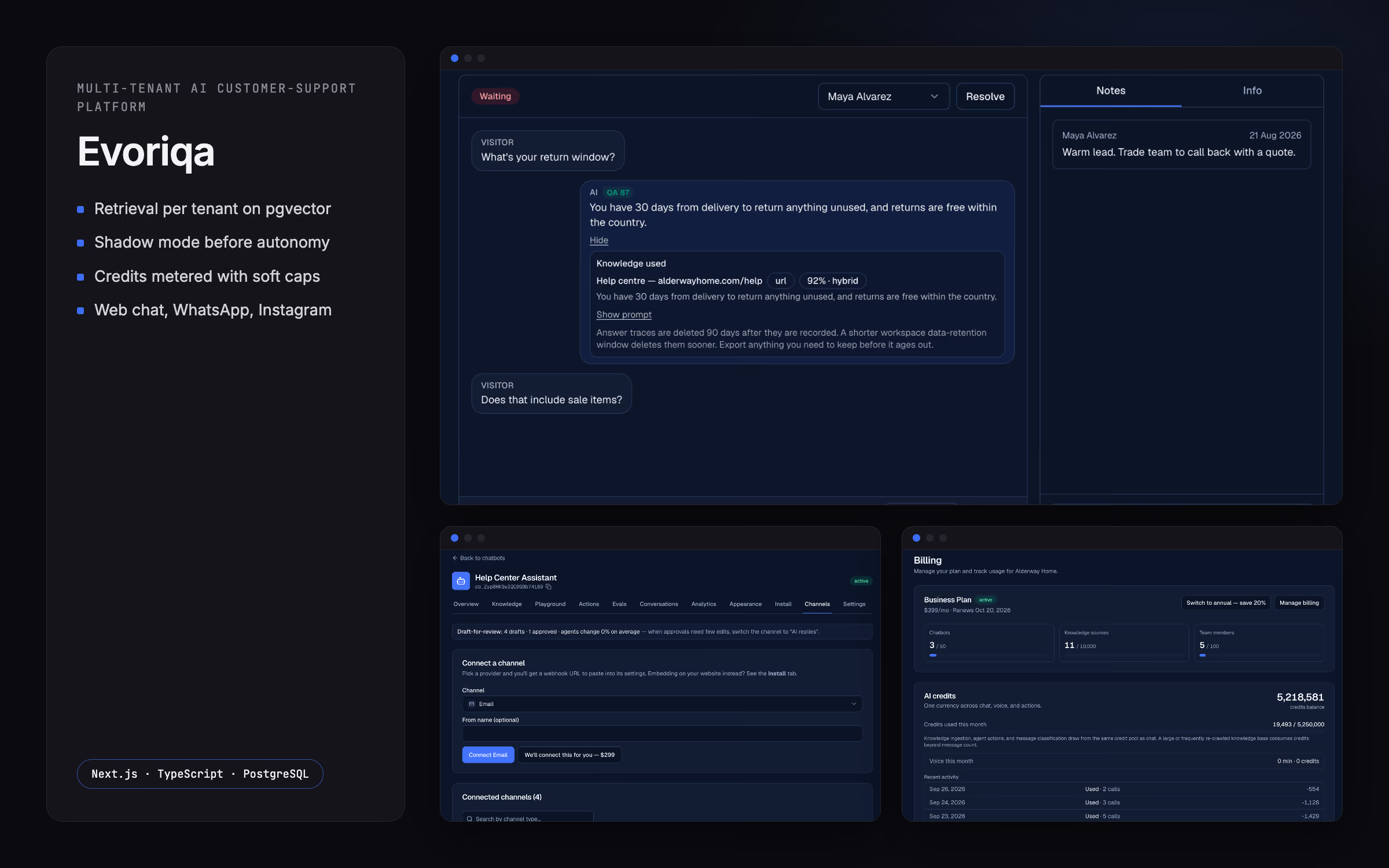
This is what I store on Evoriqa, my own AI support platform: each answer keeps what it was based on, the chunks, their scores and the prompt, so a team can see why it said what it said.
At a glance, the signals that earn their place and how to capture them:
| Signal | Why it matters | How to capture it |
|---|---|---|
| Retrieved sources and scores | Shows whether the answer had the right material to work from | Log the chunk ids, their origin and the relevance score with each answer |
| Prompt version | Tells you which template produced a reply when you are comparing changes | Tag every answer with the prompt and system-prompt version |
| Token counts and cost | Turns usage into money you can attribute | Read input and output tokens from the model response and multiply by the model's rate |
| Latency | Separates a slow model from slow code | Time retrieval and generation separately around each step |
| Feedback and edits | The closest thing to a ground-truth label | Record the rating, and whether a person changed the reply before it was sent |
| Fallback and error events | The failures APM counts as a success | Emit an explicit event when the system falls back, refuses, times out or returns empty |
Traces you can replay
Logging each field is useful. Being able to replay a single answer end to end is what actually settles an argument.
A trace stitches those fields into one record: the question came in, these chunks were retrieved at these scores, this prompt was built, the model returned this, and the user did that. When someone reports a bad answer, you open its trace and read the cause, instead of guessing. Bad answers often turn out to be bad retrieval or a stale prompt rather than the model itself, and a trace shows you which.
The practical trick is to mint one stable id per answer and thread it through retrieval, the model call and the reply. Then the trace reassembles even when those steps run on different machines or at different times.
Quality signals
Observability also has to tell you whether the answers are any good, not just whether they were produced. Three signals, from cheapest to most reliable:
- Automated scoring of test cases. Write down a fixed set of questions with known good answers and run them against the live system on a schedule. A model can act as judge for the fuzzy ones. This is what catches a regression the moment you change a prompt or swap a model.
- Scoring a sample of live replies. You cannot judge every answer by hand, but you can score a random sample in the background and watch the trend over time.
- Human edits and overrides. When a person rewrites or discards a drafted reply, that is a labelled example of the system being wrong, captured for free.
On Evoriqa, test cases run against the live agent and are scored by a model judge, and individual replies are scored in the background. Its shadow mode records, per channel, the drafts, the approvals and how much people edit before sending, so the edit rate itself becomes a quality signal. I go further into measuring retrieval quality in a separate piece on RAG evaluation.
Cost per customer and per feature
A single spend total hides the two things you need to know. Aggregate the per-answer cost two ways.
Per customer tells you who is unprofitable, and who is about to be. On a usage-based product this is the difference between a healthy account and a quiet loss. Per feature tells you which part of the product is worth its bill, and which clever addition nobody uses is costing more than it returns.
On Evoriqa, workspaces can set a monthly spend cap, and owners are emailed as usage crosses thresholds. If you want to sanity-check what a feature should cost before you build any of this, I keep a small LLM cost calculator for exactly that.
Alerts worth having
Logs you only read after a complaint are not observability. A few alerts earn their place:
- Cost spike. A sudden jump in spend per hour, or per customer, catches a retry loop, an abusive tenant, or a prompt change that quietly doubled token use.
- Latency. Rising response times at the tail usually mean the model or your retrieval has slowed, not your code.
- Fallback rate. How often the system gives its safe canned reply instead of a real answer. A climbing fallback rate means retrieval is failing or the knowledge base has a hole.
- Error rate. Timeouts, refusals, empty replies and truncations. Since your APM may record these as successes, you have to alert on them yourself.
Set thresholds you will actually act on. An alert nobody responds to is just noise, and it trains the team to ignore the next one.
Privacy and retention of logged prompts
Everything above means keeping a store of prompts and answers, and users paste personal data into prompts without being asked. Treat that store as sensitive from the start.
Decide retention deliberately: how long you keep full prompts, when you reduce an old record to metadata, and who is allowed to read them. Redact or simply never log secrets and credentials. When a customer asks for their data to be removed, make sure removal reaches the logs too, not just the main database. The point of observability is to help you explain and improve the system, not to accumulate a quiet liability in a logging table nobody owns.
When to bring in help
Most teams can add this themselves. It is logging, a few aggregates and a handful of alerts, not a platform, and building it yourself keeps the knowledge in the team.
Outside help pays off in the harder case: the model bill is climbing faster than usage and nobody can say which feature or customer is responsible, or the answers are wrong often enough to worry about but there is no measurement to prove it either way. That is what an LLM cost and RAG quality audit is for. I measure what your feature costs per request and how often it is right, then rank the changes that move both. You can see the shape of this work on Evoriqa, where answer traces and quality scoring are already in production.